In the last two years, 4K AI image generation has quietly crossed a threshold. What once sounded like a marketing buzzword — “high resolution,” “ultra HD,” “print-ready” — has become a practical expectation. Designers want visuals that hold up on large-format campaigns. Ecommerce brands need razor-sharp product shots. Content creators want cinematic frames that do not crumble under zoom, crop, or repurposing.
That demand has changed how creators define the best 4K image generator. It is no longer enough for an AI tool to output a large file. The real question is whether it can preserve detail, texture, structure, and polish at higher resolution. Among today’s strongest image-generation options, two creative directions stand out: Flux.2 Max-style resolution-first generation and Nano Banana Pro.
This article compares both approaches: what they do well, where they differ, and which one makes sense for your workflow. It also explains why using a unified platform like the Fylia AI Image Generator is often the smartest way to test models, compare results, and build a professional image workflow.
Why 4K AI Image Generation Actually Matters
Before comparing models, it helps to clarify why 4K matters at all. A true 4K AI image generator does more than stretch pixels. It preserves micro-detail: skin texture instead of plastic blur, fabric weave instead of flat color, crisp edges instead of artificial sharpening halos.
That is what separates a novelty image from something that looks usable in a campaign, product page, poster, or art book.
When creators search for the best 4K image generator, they are usually looking for three things:
- Native-looking detail, not aggressive upscaling
- Consistency, so every render meets a usable standard
- Control, so the creative intent survives at high resolution
This is also why many creators now think in terms of an ultra-HD AI image generator rather than simple AI art. The expectation is no longer just “make an image.” The expectation is “make an image that can survive professional use.”
Defining a True Ultra-HD AI Image Generator
A genuine ultra-HD AI image generator maintains structure, depth, and lighting logic at scale. The difference shows up in small details:
- hair strands stay separated instead of clumping
- shadows remain soft and physically plausible
- metal, glass, skin, and fabric react to light naturally
- composition stays stable when cropped
- textures feel intentional instead of reconstructed
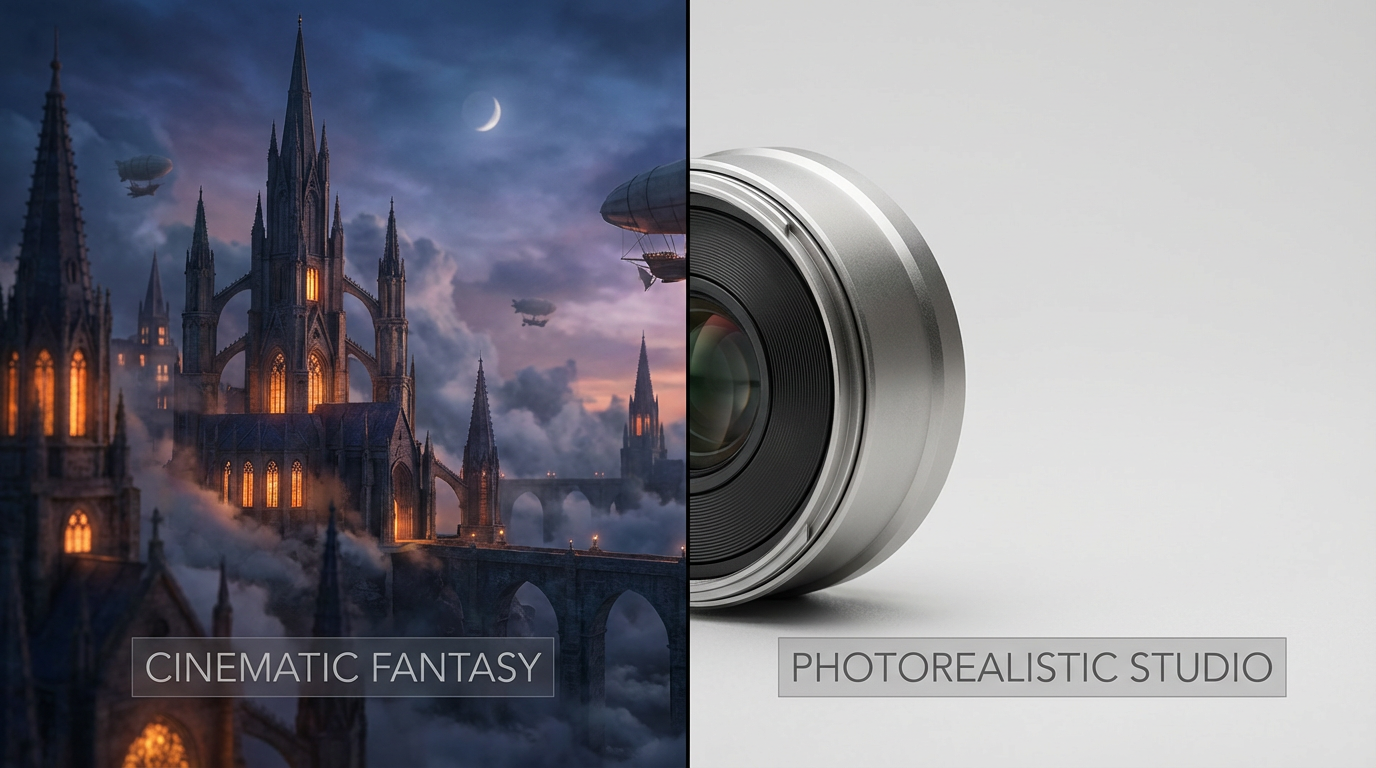
Flux.2 Max and Nano Banana Pro are both discussed in this high-resolution context, but they approach the challenge differently. One leans toward scale, atmosphere, and cinematic presence. The other leans toward prompt control, realism, and commercial reliability.
Flux.2 Max: Designed for Maximum-Resolution Visuals
Flux.2 Max is best understood as a resolution-first image model direction. Its appeal comes from scale, clarity, and the ability to create images that feel big without falling apart visually.
For creators working on cinematic environments, editorial concepts, key art, posters, fantasy scenes, sci-fi visuals, or atmospheric illustrations, this kind of model is attractive because it prioritizes the whole frame. Lighting consistency, perspective, spatial depth, and large-scene coherence matter as much as local texture.
Since I could not verify a clean Fylia model page for this exact model name, the safest Fylia replacement link is the Fylia AI Image Generator, where creators can test high-quality image workflows and compare available model behavior.
Flux.2 Max and 4K Image Generation
Where Flux.2 Max-style generation stands out is in large, cinematic compositions. Instead of feeling like a small image enlarged after the fact, the result can feel designed for scale from the beginning.
This matters for:
- key art and posters
- fantasy and sci-fi environments
- editorial illustrations
- cinematic concept frames
- images that need room for cropping
- large-format creative assets
The strength is not only sharpness. It is atmosphere. These images often work best when the goal is mood, depth, lighting, and visual presence.
That makes this style especially useful when the image is meant to feel immersive rather than purely literal.
Nano Banana Pro: Precision Meets Photorealism
If Flux.2 Max-style generation is about scale and atmosphere, Nano Banana Pro is about control, realism, and practical usability. It is designed for creators who need strong prompt responsiveness and predictable visual results.
Nano Banana Pro is especially useful when accuracy matters. If you ask for a specific product angle, lighting setup, face direction, composition, or commercial-style visual, the model is better suited to a controlled workflow.
That makes it a strong fit for:
- product photography concepts
- portraits and headshots
- brand visuals
- campaign assets
- ecommerce drafts
- polished social images
- fast design iteration
Nano Banana Pro also supports text and image prompt workflows, which makes it useful for both original creation and editing-oriented projects.
Nano Banana Pro 4K Output and Image Quality
Nano Banana Pro’s high-resolution value is less about cinematic drama and more about reliability. The goal is clean output: crisp edges, grounded compositions, readable surfaces, and photorealistic polish.
For commercial teams, that matters. A model that produces a beautiful fantasy scene may still struggle with a product shot if it invents the wrong shape, changes the logo area, or distorts the object. Nano Banana Pro is better suited to controlled image generation where the final result needs to feel believable and usable.
This makes it especially useful for:
- product mockups
- branded visuals
- clean portraits
- ad concepts
- ecommerce previews
- professional social media assets
Its value is consistency. When you need a model to stay close to the creative brief, Nano Banana Pro is often the safer choice.
Photorealism: Two Different Philosophies
Photorealism does not mean the same thing in every workflow.
With Nano Banana Pro, photorealism is often literal: accurate proportions, clean lighting, plausible textures, and minimal artistic distortion. It is the kind of realism that works well for products, people, fashion, brand content, and commercial drafts.
Flux.2 Max-style photorealism is more cinematic. It may still feel believable, but it often leans into lighting, depth, color grading, and atmosphere. It is realism shaped by storytelling.
Neither approach is universally better. They serve different creative intents.
Use cinematic realism when you want the image to feel like a movie still, book cover, poster, or concept frame. Use controlled realism when you want the image to feel like a product page, campaign asset, headshot, or brand visual.
Flux.2 Max vs Nano Banana Pro: A Direct Comparison
The comparison comes up often because these models feel complementary rather than redundant.
Flux.2 Max-style generation is stronger for:
- cinematic atmosphere
- large-scale compositions
- fantasy and sci-fi scenes
- editorial visuals
- immersive storytelling images
- key art and poster concepts
Nano Banana Pro is stronger for:
- controlled photorealistic output
- product and brand imagery
- prompt adherence
- practical commercial visuals
- fast iteration
- image editing and refinement
A useful way to think about it: Flux.2 Max-style generation is better when the image needs to feel big; Nano Banana Pro is better when the image needs to feel exact.
Which Is the Best 4K Image Generator for You?
The honest answer depends on intent.
Choose Flux.2 Max-style generation if you value:
- mood and scale
- cinematic interpretation
- large environmental scenes
- editorial or concept-art visuals
- dramatic lighting and atmosphere
Choose Nano Banana Pro if you value:
- accuracy and consistency
- commercial reliability
- clean photorealistic images
- prompt obedience
- product and brand usability
Both approaches can belong in a serious 4K AI image workflow. The key is not forcing one model to handle every job.
Why Use Fylia AI to Test High-Resolution Image Models
One of the smartest moves is not choosing too early. A unified platform like Fylia AI lets you build a more flexible image workflow instead of jumping between disconnected tools.
The Fylia AI Image Generator is useful because it supports text and image prompt workflows and lets creators experiment with advanced image models in one place. If you want to test Nano Banana Pro directly, start with the Nano Banana Pro AI image generator.
This approach gives creators several advantages:
- faster iteration
- easier model comparison
- smoother text-to-image and image-to-image workflows
- better prompt reuse
- fewer workflow interruptions
- a practical path from draft to polished visual
Instead of deciding in theory, test the same prompt through different model styles and compare the result. Look at detail, prompt accuracy, lighting, texture, composition, and how well the image survives cropping.
Practical Workflow: How to Compare the Two Approaches
Use the same prompt and judge both models by the same criteria.
Step 1: Start With a Clear Prompt
Use a prompt that defines subject, environment, lighting, camera angle, and style.
Example:
A luxury skincare bottle on a polished stone surface, soft studio lighting, shallow depth of field, realistic glass reflections, clean beige background, premium ecommerce photography, ultra-detailed texture, high-resolution commercial image.
Step 2: Test for Detail
Zoom into skin, fabric, glass, labels, background edges, and shadows. A strong 4K workflow should preserve believable detail without crunchy artificial sharpening.
Step 3: Test for Prompt Accuracy
Ask whether the output followed the actual request. Did it preserve the product angle? Did it keep the lighting mood? Did it change the scene unnecessarily?
Step 4: Test for Usability
Could the result work in an ad, landing page, poster, thumbnail, or print layout? This matters more than whether the image looks impressive at first glance.
Step 5: Pick Based on the Job
Use the cinematic model direction for mood-driven visuals. Use Nano Banana Pro for controlled commercial output. Use the Fylia AI Image Generator as the testing ground for both kinds of workflows.
Final Verdict
The debate around Flux.2 Max vs Nano Banana Pro is not about crowning a single winner. It is about understanding that the best 4K image generator depends on context.
Flux.2 Max-style generation delivers scale, atmosphere, and cinematic presence. Nano Banana Pro delivers precision, realism, and commercial reliability. Together, they represent two important directions in ultra-HD AI image generation.
If you are serious about 4K visuals for art, branding, ecommerce, or production, the smartest approach is simple: test both styles, understand their strengths, and use each where it shines most.
Start with Fylia AI Image Generator for high-resolution image creation and use Nano Banana Pro when precision and photorealistic control matter most.
Related Articles
- Best 4K Image Generator 2026: Flux.2 Max vs Nano Banana Pro
- The Complete Guide to Flux.2 Pro AI Image Generation: Features, Tips, Prompts, and Why Creators Love It
- Nano Banana 2 vs Nano Banana Pro: Which AI Image Model Should You Use?
- GPT Image 2 for 4K Visual Design: A Practical Guide for Posters, Brand Assets, and Multi-Image Editing




















