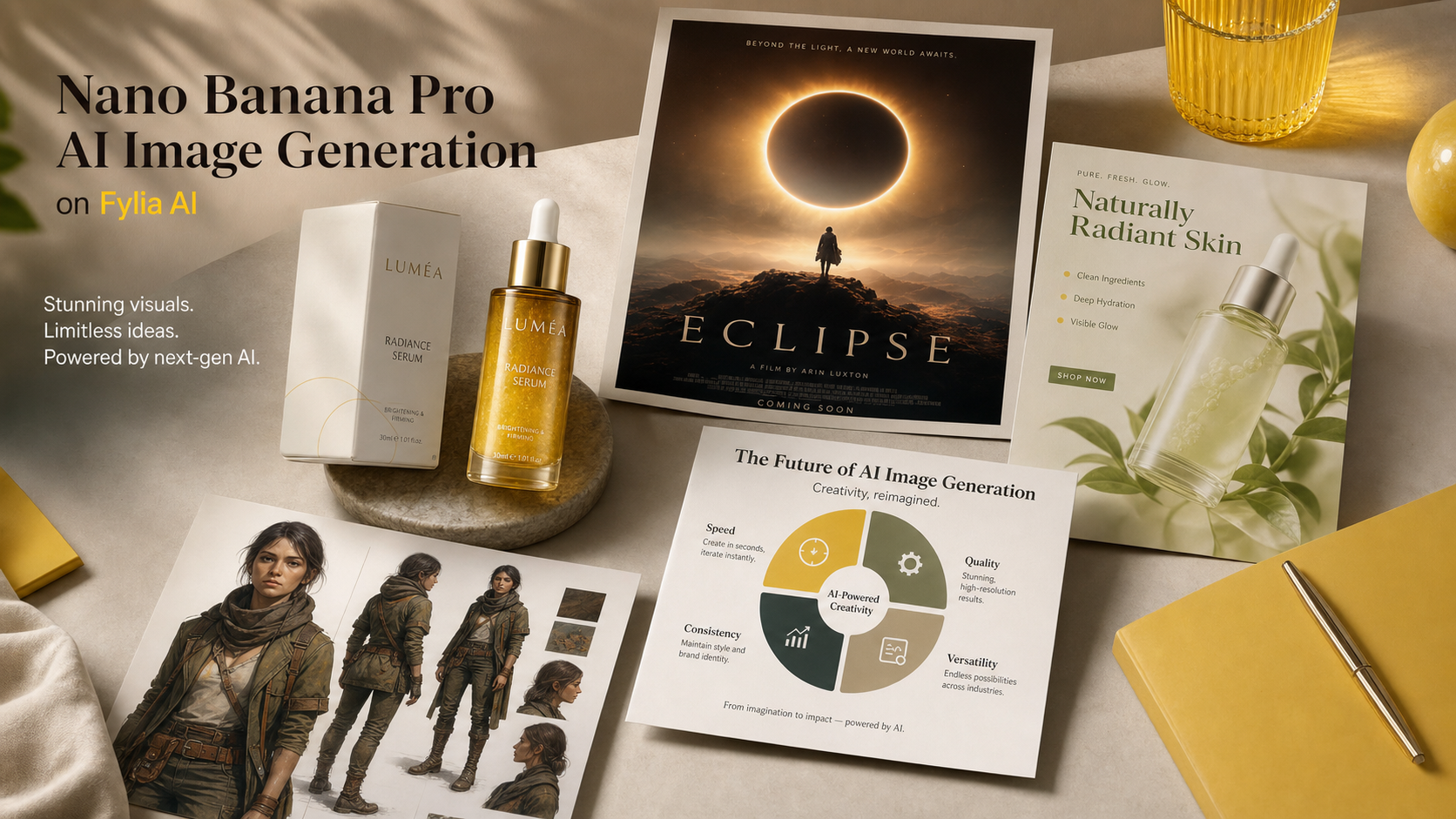
Creators search for Nano Banana Pro because they want sharper prompts, cleaner edits, and more reliable image outputs without rebuilding every visual from scratch. On Fylia AI, the practical workflow is simple: start with a clear creative goal, choose the right image model, use references when needed, and review the result like a draft for a real campaign.
This guide explains how to use Nano Banana Pro for product images, posters, ecommerce ads, social visuals, character concepts, infographics, and image editing. It also shows when to stay with Nano Banana AI, when to test Nano Banana Pro, and when another Fylia model such as GPT Image 2 or Seedream 5.0 AI may fit the job better.

What Nano Banana Pro Is and Why Creators Compare It with Nano Banana AI
Nano Banana Pro is best understood as the higher-end option for creators who need more controlled AI image generation and editing. The exact live feature set can change by platform, but the user intent is clear: people want stronger prompt following, cleaner composition, better text-aware layouts, improved reference handling, and more polished images for commercial-looking work.
Google positions Nano Banana Pro around Gemini 3 Pro Image, while the earlier Nano Banana AI workflow is commonly discussed around Gemini 2.5 Flash Image-style creation. In practical terms, that means many creators treat Nano Banana AI as a fast starting point and Nano Banana Pro as the model to test when the image needs stronger direction, more refined layout, or better visual reasoning.
Use Nano Banana AI when you need quick ideation, early moodboards, simple social visuals, and fast image drafts. Move to Nano Banana Pro when you need a more finished poster, a product ad, a cleaner ecommerce image, a consistent character visual, a more readable diagram, or a reference-based edit where details matter.
| Need | Try First | Why |
|---|---|---|
| Fast concept drafts | Nano Banana AI | Good for quick exploration and basic prompt testing. |
| Product hero images | Nano Banana Pro | Better fit when composition, material, and campaign polish matter. |
| Posters and social ads | Nano Banana Pro | Useful for controlled layout, visual hierarchy, and text-space planning. |
| Alternative image models | GPT Image 2 or Seedream 5.0 AI | Worth comparing when style, text, or editing behavior differs by model. |
| Prompt support | Image to Prompt or AI Prompt Generator | Helps turn rough ideas or references into clearer prompts. |
The main point is not that one model replaces every other model. A better workflow is to compare the same brief across models, keep the version with the strongest structure, and refine from there.

How to Use Nano Banana Pro on Fylia AI for Better AI Images
The fastest way to use Nano Banana Pro on Fylia AI is to write the prompt like a creative brief, not a keyword pile. Start with the output type, define the subject, explain the composition, add lighting and style, then name what must be preserved or avoided.
Here is a practical Fylia AI workflow:
- Open the Nano Banana Pro AI page or start from the broader AI image generator.
- Choose Nano Banana Pro when you want a more polished generation or edit. Use the Nano Banana AI page for faster initial prompt exploration.
- If you are editing an existing image, use Image to Image and upload a clean reference.
- If the reference image is hard to describe, run it through Free Image Describer or Image to Prompt first.
- Write a prompt that includes subject, composition, lighting, style, preserved details, aspect ratio, use case, and exclusions.
- Generate more than one version. Compare product shape, lighting, text space, visual hierarchy, hands, faces, small objects, and background clutter.
- Revise the prompt with fewer competing ideas. Ask for one clear image, one clear layout, and one clear purpose.
- Before publishing, check the current Fylia AI settings for credits, privacy, export behavior, watermark, and commercial-use terms.
For image editing, the source image matters as much as the prompt. A front-facing product photo with clean lighting is easier to preserve than a low-resolution image with glare, motion blur, cropped edges, or background clutter. For brand visuals, keep the reference simple and ask the model to preserve product shape, material, color palette, and label area without inventing fake logos or claims.

Best Nano Banana Pro Use Cases: Product Images, Posters, Ads, Characters, and Infographics
Nano Banana Pro is most useful when the image needs both creative polish and practical structure. A vague prompt can still produce an attractive image, but a structured prompt helps the output become usable for a product page, campaign mockup, social post, or editorial asset.
Strong use cases include:
- Product images: ecommerce product photos, product hero shots, lifestyle scenes, packaging mockups, and product bundles.
- Posters: movie-style posters, event visuals, campaign key art, blog covers, and high-impact thumbnails.
- Social media ads: 1:1, 4:5, and 9:16 visuals with clean headline space, clear subject hierarchy, and campaign mood.
- Character concepts: consistent outfit, silhouette, color palette, and personality direction for games, stories, or brand mascots.
- Infographics and diagrams: clean educational visuals, step-by-step explainers, comparison layouts, and simplified concept graphics.
- Image editing: background replacement, lighting improvement, product cleanup, style transfer, and reference-based visual rebuilding.
For product sellers, the goal is usually not “make it beautiful” but “make the product clear.” For social media teams, the goal is not only “make it eye-catching” but “make it readable in a feed.” For designers and marketers, the best Nano Banana Pro prompt usually names the business purpose: ecommerce listing, paid social concept, poster draft, landing page hero, campaign visual, or blog cover.
When you compare outputs, look for errors that affect real use: distorted labels, invented text, inaccurate product shape, awkward hands, overfilled composition, unreadable details, mismatched shadows, and visual claims that imply more than the product can support.

Nano Banana Pro Prompt Guide: Formulas and Copy-Ready Examples
Good Nano Banana Pro prompts are specific about the image’s purpose. Instead of asking for “a cool product ad,” define the product, platform, layout, lighting, preserved details, and what the image should avoid.
Reusable Nano Banana Pro prompt formula
Create a [type of image] for [use case]. Subject: [main subject]. Composition: [centered / close-up / wide editorial layout / product hero shot / poster layout / social ad layout]. Lighting: [studio / natural daylight / cinematic / softbox / golden hour / neon]. Style: [photorealistic / editorial / ecommerce / poster / infographic / brand campaign / character concept]. Details to preserve: [identity / product shape / color palette / text area / material / outfit / background mood]. Output should be [aspect ratio] for [platform or purpose]. Avoid [fake logos / unreadable tiny text / distorted hands / misleading claims / crowded background].
Image editing formula
Edit this image while preserving [main subject, identity, product shape, materials, colors, and key details]. Change [background / lighting / composition / style / campaign mood] to [desired result]. Keep the image realistic, clean, and suitable for [ecommerce / social ad / poster / blog cover / brand visual]. Avoid fake logos, distorted text, changed product identity, extra objects, and unrealistic claims.
Product image formula
Create a photorealistic product image for [product type]. Preserve [shape, material, color, packaging structure, label area, and scale]. Use [studio / lifestyle / ecommerce / editorial] lighting with realistic shadows and a clean background. Composition: [hero shot / close-up / 3/4 angle / flat lay]. Output ratio: [1:1 / 4:5 / 16:9]. Leave clean space for optional marketing copy.
Poster formula
Create a cinematic poster for [campaign, event, product, or fictional concept]. Main subject: [subject]. Visual hierarchy: strong focal point, clear title space, balanced supporting elements, and dramatic lighting. Mood: [premium / playful / mysterious / energetic / seasonal]. Use [16:9 / 4:5 / vertical] composition. Avoid copyrighted characters, real logos, unreadable tiny text, and misleading claims.
Infographic formula
Create a clean visual infographic about [topic]. Show [3 to 5] simple sections with clear icons, balanced spacing, readable headline areas, and a modern editorial style. Keep the design minimal, accurate, and easy to scan. Avoid tiny text, fake numbers, cluttered labels, and unsupported claims.
Copy-ready Nano Banana Pro prompt examples
- Create a premium ecommerce product image of a minimalist skincare bottle on a pale stone surface. Use soft studio lighting, realistic shadows, subtle water droplets, clean luxury composition, and no readable brand text. Output 1:1.
- Use this uploaded product photo as reference. Preserve the bottle shape, cap color, material texture, and label area. Place it on a luxury bathroom counter with soft morning light, realistic reflections, and clean space for ad copy. Output 4:5.
- Create a cinematic poster for a fictional sci-fi short film. A lone astronaut stands before a glowing portal in a desert at dusk. Strong visual hierarchy, dramatic light, wide composition, clear title space, no real movie logos. Output 16:9.
- Create a social ad image for a coffee product. Show a warm morning kitchen scene with the product on the counter, steam rising from a cup, natural sunlight, cozy campaign mood, and blank headline space. Output 4:5.
- Create a clean infographic explaining three steps for better product photography: lighting, composition, and background. Use simple icons, spacious layout, modern editorial design, and readable headline areas. Avoid fake data.
- Edit this uploaded portrait into a polished studio headshot. Preserve identity, face shape, skin tone, hairstyle, and expression. Improve lighting, background simplicity, and professional mood without changing the person.
- Create a character concept image of a futuristic delivery pilot with a consistent outfit, practical backpack, reflective jacket details, friendly expression, clean full-body pose, and neutral studio background.
- Create a 16:9 blog cover for an article about AI image generation. Show a modern creative studio with image boards, product visuals, poster drafts, and soft blue-purple lighting. Do not show fake software UI.
- Create a wireless earbuds campaign visual. The charging case is open on a clean desk, earbuds visible, subtle reflections, premium tech lighting, minimal props, and a modern lifestyle mood. Output 1:1.
- Edit this winter portrait into a seasonal campaign visual. Preserve the person, coat, scarf, and pose. Improve snow lighting, add warm shop-window glow, keep the background realistic, and leave space for short copy.
- Create three visual directions for the same product: ecommerce hero shot, social ad, and editorial poster. Keep the product identity stable while changing composition, lighting, and campaign mood.
- Create a multilingual poster layout with a clear central product, generous readable headline space, clean background, and elegant color palette. Avoid real logos, trademarked marks, tiny text, and fake claims.
If the first output misses the intent, revise one variable at a time. Tighten the subject, simplify the background, name the aspect ratio, or ask for cleaner headline space. Small prompt changes usually work better than stacking five new ideas into one generation.

When to Use Nano Banana Pro vs GPT Image 2, Seedream, or Nano Banana AI
Use Nano Banana Pro when you want polished image creation or editing and you care about prompt structure, visual hierarchy, and campaign-ready composition. Use Nano Banana AI when speed and exploration matter more than final polish. Use GPT Image 2 or Seedream 5.0 AI as comparison options when a different model may handle text rendering, image editing, style control, or reference behavior better for your specific brief.
On Fylia AI, that model-choice process can stay practical:
| Workflow | Recommended starting point | What to compare |
|---|---|---|
| Quick concept ideation | Nano Banana AI | Speed, prompt variety, rough composition. |
| Product and ad visuals | Nano Banana Pro | Product shape, lighting, shadows, layout, commercial polish. |
| Text-heavy image concepts | GPT Image 2 or Nano Banana Pro | Readability, text placement, and whether text should be added later in design software. |
| Reference-based editing | Nano Banana Pro, Image to Image, Seedream 5.0 AI | Identity preservation, background change quality, and unwanted alterations. |
| Prompt support | Free Image Describer, Image to Prompt, AI Prompt Generator | Whether the prompt captures subject, composition, lighting, and use case clearly. |
Before export, run a creator-side review rather than assuming the first strong-looking image is ready. Check product accuracy, claim safety, source-image rights, model-page availability, privacy settings, credits, watermark behavior, export size, and whether the final platform allows the intended commercial use.
FAQ
Is Nano Banana Pro better than Nano Banana AI?
Nano Banana Pro is the better model to test when you need more polished, controlled, campaign-style images. Nano Banana AI can still be useful for fast ideation, rough drafts, and simpler image generation.
Can I use Nano Banana Pro for product images?
Yes, it is a strong fit for product hero shots, ecommerce-style visuals, lifestyle product scenes, and social ads. Use clear reference images when product shape, material, color, or packaging details must stay consistent.
Should I add text inside the generated image?
For short poster-style headline space, you can prompt for readable areas and simple layout. For final ad text, pricing, legal copy, and brand marks, it is usually cleaner to add text in a design editor after generation.
How do I make prompts more reliable?
Use a structured prompt with image type, subject, composition, lighting, style, preserved details, aspect ratio, and exclusions. If you have a reference image, describe it first with Fylia AI’s Free Image Describer or Image to Prompt.
Conclusion
Nano Banana Pro is most useful when your image brief needs more than a pretty draft: product accuracy, strong composition, clean campaign layout, and repeatable prompt control. On Fylia AI, the practical approach is to start with the right model, use references and prompt tools when needed, compare outputs, and review the final image before using it in ecommerce, social media, or brand work.
Related Articles
- 10 Best Prompt Ideas for Nano Banana Pro: A Complete AI Image Prompt Guide
- How to Design Eye-Catching Posters with Nano Banana Pro
- Mastering Christmas Image Creation with Nano Banana Pro
- Nano Banana 2 vs Nano Banana Pro: Which AI Image Model Should You Use?
- How to Use Nano Banana AI to Generate Professional Ad Photos
People Also Read
- Gemini 3 Pro Image on Google DeepMind
- Google: Nano Banana Pro
- Gemini Image Generation Overview
- Fylia AI Nano Banana AI
- Fylia AI Nano Banana Pro AI
- Fylia AI Image to Image





















