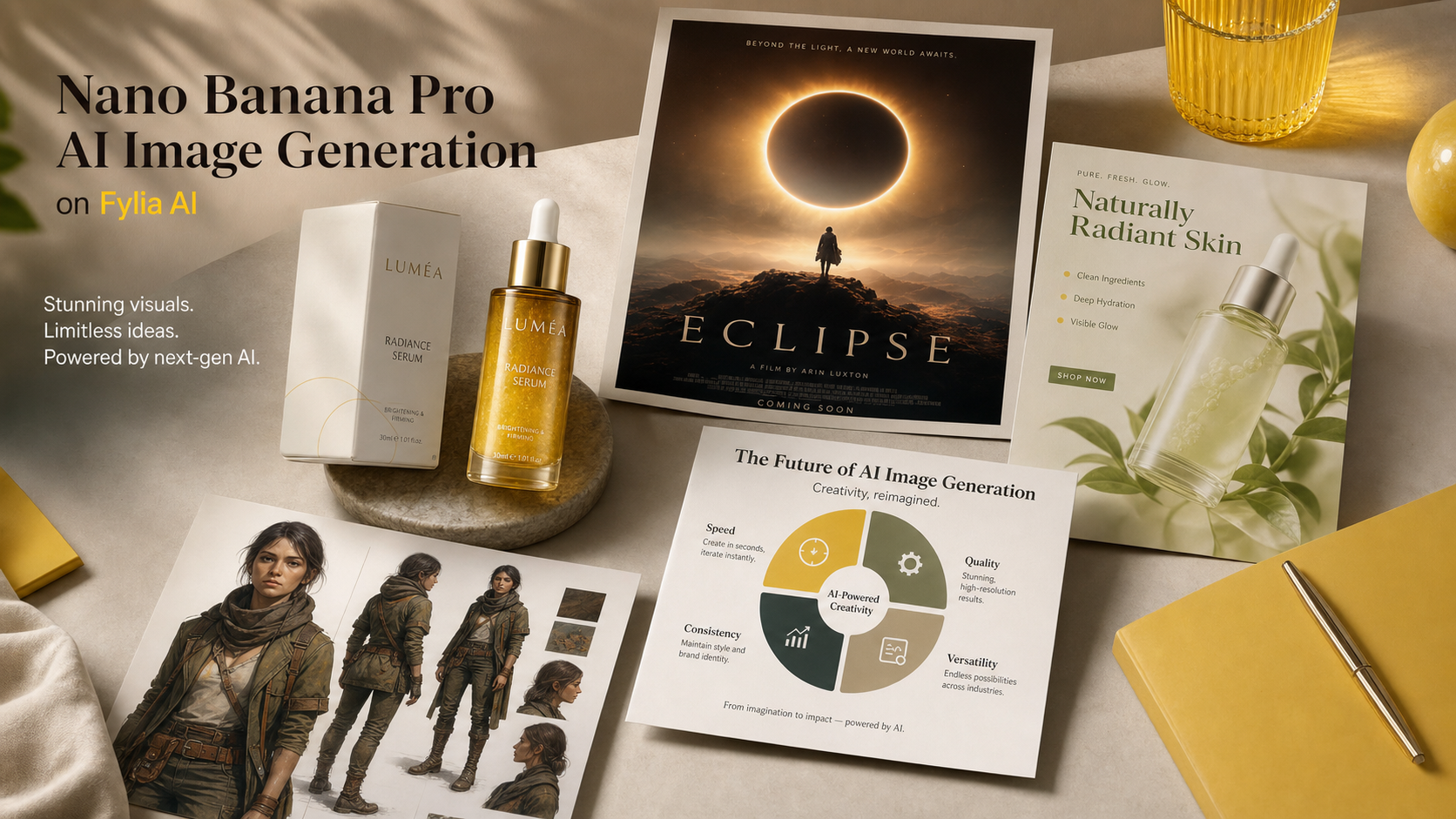
創作者搜尋 Nano Banana Pro 是因為他們想要更銳利的提示詞、更乾淨的編修,以及更可靠的影像輸出,而不必從零開始重建每一張視覺素材。在 Fylia AI 上,實用的工作流程很簡單:先確立清晰的創意目標、選對影像模型、需要時使用參考圖,並像審稿真實行銷企劃一樣檢視結果。
本指南說明如何用 Nano Banana Pro 製作商品圖、海報、電商廣告、社群視覺、角色概念、資訊圖表與影像編修。也會告訴你何時該繼續用 Nano Banana AI、何時該測試 Nano Banana Pro,以及何時改用其他 Fylia 模型(例如 GPT Image 2 或 Seedream 5.0 AI)會更適合。

Nano Banana Pro 是什麼,以及為什麼創作者會拿它和 Nano Banana AI 比較
Nano Banana Pro 最好理解成:針對需要更可控的 AI 影像生成與編修的創作者所提供的高階選項。實際可用功能會隨平台而變動,但使用者意圖很明確:大家想要更強的提示詞遵循、更乾淨的構圖、更懂文字的版面安排、更好的參考圖處理,以及更精緻、適合商業用途的影像質感。
Google 將 Nano Banana Pro 定位在 Gemini 3 Pro Image 的區間,而較早期的 Nano Banana AI 流程常被討論為接近 Gemini 2.5 Flash Image 風格的創作。實務上,很多創作者把 Nano Banana AI 當作快速起手式;當圖片需要更強指向、更精緻版面或更好的視覺推理時,就會改測 Nano Banana Pro。
當你需要快速發想、初期 moodboard、簡單社群視覺與快速草稿時,用 Nano Banana AI。當你需要更完成的海報、商品廣告、更乾淨的電商圖、角色一致性更高的視覺、更易讀的圖解,或是細節很重要的參考圖編修,就換到 Nano Banana Pro。
| 需求 | 先試試 | 為什麼 |
|---|---|---|
| 快速概念草稿 | Nano Banana AI | 適合快速探索與基本提示詞測試。 |
| 商品主視覺(hero) | Nano Banana Pro | 當構圖、材質與行銷級質感很重要時更合適。 |
| 海報與社群廣告 | Nano Banana Pro | 有助於控制版面、視覺層級與文字留白規劃。 |
| 其他影像模型 | GPT Image 2 或 Seedream 5.0 AI | 當不同模型在風格、文字或編修行為上更符合需求時值得比較。 |
| 提示詞支援 | Image to Prompt 或 AI Prompt Generator | 協助把粗略想法或參考圖轉成更清晰的提示詞。 |
重點不在於某個模型能取代所有模型。更好的流程是:把同一份 brief 交給不同模型比較,保留結構最強的一版,再從那裡繼續精修。

如何在 Fylia AI 上使用 Nano Banana Pro 以產生更好的 AI 圖像
在 Fylia AI 上使用 Nano Banana Pro 最快的方法,是把提示詞寫成「創意簡報(creative brief)」而不是一堆關鍵字。先說明輸出類型、定義主體、解釋構圖、補上光線與風格,接著指明哪些必須保留、哪些必須避免。
以下是一個實用的 Fylia AI 工作流程:
- 打開 Nano Banana Pro AI 頁面,或從更完整的 AI image generator 開始。
- 當你想要更精緻的生成或編修時選 Nano Banana Pro。若要更快做初期提示詞探索,使用 Nano Banana AI 頁面。
- 如果要編修既有圖片,使用 Image to Image 並上傳乾淨的參考圖。
- 若參考圖難以描述,先用 Free Image Describer 或 Image to Prompt 生成描述。
- 撰寫包含主體、構圖、光線、風格、需保留細節、長寬比、用途與排除項的提示詞。
- 生成不只一個版本。比較商品外形、光線、文字留白、視覺層級、手部、臉部、小物件與背景雜訊。
- 用更少的互相競爭想法來修訂提示詞。要求一張清楚的圖、一個清楚的版面與一個清楚的目的。
- 發佈前,確認 Fylia AI 目前設定:點數、隱私、匯出行為、浮水印與商用條款。
做影像編修時,來源圖的重要性不亞於提示詞。正面、打光乾淨的商品照,比起低解析度、反光、動態模糊、邊緣被裁切或背景雜亂的圖片,更容易被穩定保留。做品牌視覺時,請保持參考圖簡潔,並要求模型保留商品外形、材質、色盤與標籤區域,不要憑空生成假 Logo 或假宣稱。

Nano Banana Pro 最佳使用情境:商品圖、海報、廣告、角色與資訊圖表
當影像既需要創意質感,也需要可用的結構時,Nano Banana Pro 最有價值。即使很模糊的提示詞也可能生成漂亮圖片,但結構化提示詞能讓輸出更能直接用在商品頁、活動 mockup、社群貼文或編輯素材上。
強勢使用情境包含:
- **商品圖片:**電商商品照、商品主視覺、生活情境圖、包裝 mockup、商品組合圖。
- **海報:**電影風海報、活動視覺、企劃 key art、部落格封面、高衝擊縮圖。
- **社群廣告:**適用 1:1、4:5、9:16 的素材,具乾淨標題留白、清晰主體層級與活動氛圍。
- **角色概念:**服裝、輪廓、色盤與個性方向一致,適用遊戲、故事或品牌吉祥物。
- **資訊圖與圖解:**乾淨的教育視覺、步驟說明、比較版面、簡化概念圖。
- **影像編修:**換背景、改善打光、商品清理、風格轉換、依參考重建視覺。
對賣家而言,目標往往不是「變漂亮」,而是「商品要清楚」。對社群團隊而言,目標不只是「吸睛」,還要「在動態牆上可讀」。對設計師與行銷人而言,最好的 Nano Banana Pro 提示詞通常會點名商務目的:電商上架圖、付費社群概念、海報草稿、落地頁主視覺、活動視覺或部落格封面。
比較輸出時,請留意會影響實際使用的錯誤:標籤變形、憑空編造文字、商品形狀不準、手部怪異、構圖過滿、細節不可讀、陰影不一致,以及暗示超出商品能力的視覺宣稱。

Nano Banana Pro 提示詞指南:公式與可直接複製的範例
好的 Nano Banana Pro 提示詞會明確指定影像用途。不要只說「做一張很酷的商品廣告」,而是要定義商品、平台、版面、光線、需保留細節,以及要避免的內容。
可重複使用的 Nano Banana Pro 提示詞公式
Create a [type of image] for [use case]. Subject: [main subject]. Composition: [centered / close-up / wide editorial layout / product hero shot / poster layout / social ad layout]. Lighting: [studio / natural daylight / cinematic / softbox / golden hour / neon]. Style: [photorealistic / editorial / ecommerce / poster / infographic / brand campaign / character concept]. Details to preserve: [identity / product shape / color palette / text area / material / outfit / background mood]. Output should be [aspect ratio] for [platform or purpose]. Avoid [fake logos / unreadable tiny text / distorted hands / misleading claims / crowded background].
影像編修公式
Edit this image while preserving [main subject, identity, product shape, materials, colors, and key details]. Change [background / lighting / composition / style / campaign mood] to [desired result]. Keep the image realistic, clean, and suitable for [ecommerce / social ad / poster / blog cover / brand visual]. Avoid fake logos, distorted text, changed product identity, extra objects, and unrealistic claims.
商品圖公式
Create a photorealistic product image for [product type]. Preserve [shape, material, color, packaging structure, label area, and scale]. Use [studio / lifestyle / ecommerce / editorial] lighting with realistic shadows and a clean background. Composition: [hero shot / close-up / 3/4 angle / flat lay]. Output ratio: [1:1 / 4:5 / 16:9]. Leave clean space for optional marketing copy.
海報公式
Create a cinematic poster for [campaign, event, product, or fictional concept]. Main subject: [subject]. Visual hierarchy: strong focal point, clear title space, balanced supporting elements, and dramatic lighting. Mood: [premium / playful / mysterious / energetic / seasonal]. Use [16:9 / 4:5 / vertical] composition. Avoid copyrighted characters, real logos, unreadable tiny text, and misleading claims.
資訊圖表公式
Create a clean visual infographic about [topic]. Show [3 to 5] simple sections with clear icons, balanced spacing, readable headline areas, and a modern editorial style. Keep the design minimal, accurate, and easy to scan. Avoid tiny text, fake numbers, cluttered labels, and unsupported claims.
可直接複製的 Nano Banana Pro 提示詞範例
- Create a premium ecommerce product image of a minimalist skincare bottle on a pale stone surface. Use soft studio lighting, realistic shadows, subtle water droplets, clean luxury composition, and no readable brand text. Output 1:1.
- Use this uploaded product photo as reference. Preserve the bottle shape, cap color, material texture, and label area. Place it on a luxury bathroom counter with soft morning light, realistic reflections, and clean space for ad copy. Output 4:5.
- Create a cinematic poster for a fictional sci-fi short film. A lone astronaut stands before a glowing portal in a desert at dusk. Strong visual hierarchy, dramatic light, wide composition, clear title space, no real movie logos. Output 16:9.
- Create a social ad image for a coffee product. Show a warm morning kitchen scene with the product on the counter, steam rising from a cup, natural sunlight, cozy campaign mood, and blank headline space. Output 4:5.
- Create a clean infographic explaining three steps for better product photography: lighting, composition, and background. Use simple icons, spacious layout, modern editorial design, and readable headline areas. Avoid fake data.
- Edit this uploaded portrait into a polished studio headshot. Preserve identity, face shape, skin tone, hairstyle, and expression. Improve lighting, background simplicity, and professional mood without changing the person.
- Create a character concept image of a futuristic delivery pilot with a consistent outfit, practical backpack, reflective jacket details, friendly expression, clean full-body pose, and neutral studio background.
- Create a 16:9 blog cover for an article about AI image generation. Show a modern creative studio with image boards, product visuals, poster drafts, and soft blue-purple lighting. Do not show fake software UI.
- Create a wireless earbuds campaign visual. The charging case is open on a clean desk, earbuds visible, subtle reflections, premium tech lighting, minimal props, and a modern lifestyle mood. Output 1:1.
- Edit this winter portrait into a seasonal campaign visual. Preserve the person, coat, scarf, and pose. Improve snow lighting, add warm shop-window glow, keep the background realistic, and leave space for short copy.
- Create three visual directions for the same product: ecommerce hero shot, social ad, and editorial poster. Keep the product identity stable while changing composition, lighting, and campaign mood.
- Create a multilingual poster layout with a clear central product, generous readable headline space, clean background, and elegant color palette. Avoid real logos, trademarked marks, tiny text, and fake claims.
如果第一次輸出沒有命中意圖,一次只調整一個變因。收緊主體、簡化背景、指定長寬比,或要求更乾淨的標題留白。小幅度修改提示詞,通常比在同一次生成裡硬塞五個新點子更有效。

何時使用 Nano Banana Pro vs GPT Image 2、Seedream 或 Nano Banana AI
當你想要更精緻的影像生成或編修,且在意提示詞結構、視覺層級與可直接用於活動的構圖時,用 Nano Banana Pro。當速度與探索比最終精修更重要時,用 Nano Banana AI。當你覺得不同模型在文字渲染、影像編修、風格控制或參考圖行為上可能更適合你的 brief 時,使用 GPT Image 2 或 Seedream 5.0 AI 來做對照比較。
在 Fylia AI 上,模型選擇流程可以保持務實:
| 流程 | 建議起點 | 比較重點 |
|---|---|---|
| 快速概念發想 | Nano Banana AI | 速度、提示詞變化、粗略構圖。 |
| 商品與廣告視覺 | Nano Banana Pro | 商品形狀、光線、陰影、版面、商業級質感。 |
| 文字占比高的影像概念 | GPT Image 2 或 Nano Banana Pro | 可讀性、文字位置,以及是否該改在設計軟體後製上字。 |
| 參考圖導向的編修 | Nano Banana Pro、Image to Image、Seedream 5.0 AI | 身分/主體保留、換背景品質、非預期改動。 |
| 提示詞支援 | Free Image Describer、Image to Prompt、AI Prompt Generator | 提示詞是否清楚涵蓋主體、構圖、光線與用途。 |
匯出前,請做一次創作者端的審核,而不是假設第一張看起來很強的圖就能直接上線。檢查商品準確性、宣稱安全、來源圖片權利、模型頁面可用性、隱私設定、點數、浮水印行為、匯出尺寸,以及目標平台是否允許預期的商業用途。
FAQ
Nano Banana Pro 比 Nano Banana AI 更好嗎?
當你需要更精緻、可控、偏活動視覺風格的圖片時,Nano Banana Pro 更值得測試。Nano Banana AI 仍然很適合快速發想、粗稿與較簡單的影像生成。
我可以用 Nano Banana Pro 做商品圖嗎?
可以,它很適合商品主視覺、電商風格素材、生活情境商品圖與社群廣告。當商品形狀、材質、顏色或包裝細節必須一致時,請使用清晰參考圖。
我應該把文字直接做在生成圖片裡嗎?
若是海報式的短標題留白,可以用提示詞要求可讀區域與簡單版面。但最終廣告文案、價格、法務文字與品牌標記,通常在生成後用設計軟體加字會更乾淨。
如何讓提示詞更可靠?
使用結構化提示詞:影像類型、主體、構圖、光線、風格、需保留細節、長寬比與排除項。如果有參考圖,先用 Fylia AI 的 Free Image Describer 或 Image to Prompt 把它描述清楚。
結論
Nano Banana Pro 最有價值的時刻,是當你的影像 brief 不只是「好看草稿」,而是需要商品準確性、強構圖、乾淨的活動版面,以及可重複的提示詞控制。在 Fylia AI 上,務實作法是從選對模型開始,需要時搭配參考圖與提示詞工具,對照比較輸出,並在用於電商、社群或品牌素材前審核最終影像。
相關文章
- 10 Best Prompt Ideas for Nano Banana Pro: A Complete AI Image Prompt Guide
- How to Design Eye-Catching Posters with Nano Banana Pro
- Mastering Christmas Image Creation with Nano Banana Pro
- Nano Banana 2 vs Nano Banana Pro: Which AI Image Model Should You Use?
- How to Use Nano Banana AI to Generate Professional Ad Photos
大家也在看
- Gemini 3 Pro Image on Google DeepMind
- Google: Nano Banana Pro
- Gemini Image Generation Overview
- Fylia AI Nano Banana AI
- Fylia AI Nano Banana Pro AI
- Fylia AI Image to Image





















