
After Gemini, GPT-4o, Doubao AI and other image models have successively "changed pictures with their mouths", another more powerful image editing model is here - Flux Kontext, a generative image model suite launched by Black Forest Labs. Unlike traditional text-to-image models, Flux Kontext understands both text and image inputs, enabling true “context generation and editing”. It solves almost all of the long-standing AI-generated image problems, including character/subject consistency, image transfer, style transfer, local refinement, and text replacement within images. Looking at the following test cases, it is impossible not to find the results amazing.
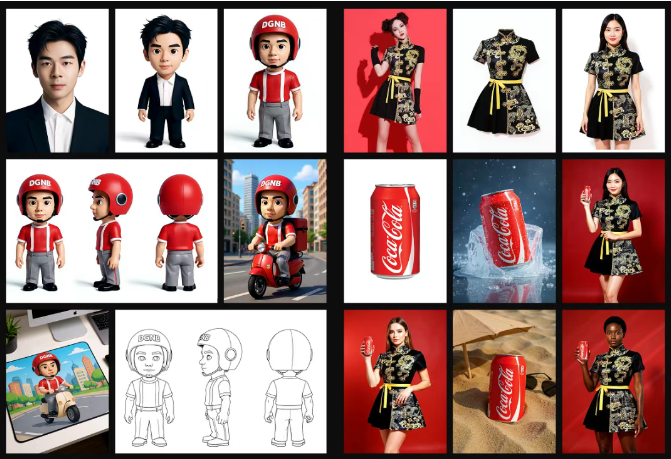
In order to meet the needs of different users, it provides two versions, MAX and PRO. Currently, many mainstream AI tools have been connected to this model. Let's first disassemble the real capabilities of the image editor by flux kontext pro.
What is Flux Kontext Image Editor?
Flux Kontext is the latest generative image model suite launched by Black Forest Labs. It uses an innovative flow matching architecture to complete complex image modifications through simple instructions, breaking the traditional "text encoder + diffusion model" mode of fighting each other. In layman's terms, in the past we processed text and images separately, while Flux Kontext uniformly encodes text prompts and reference images into a "context" sequence. In this way, the model can not only understand the visual concept you want to express, but also accurately recognize the semantic instructions you provide, realizing the true meaning of "what you see is what you get".
What are the highlights of image editor by flux kontext pro?
- Character consistency: Keep the consistency of characters or elements in multiple scenes
- Portion editing: Edit only a specific part of the image without affecting other areas
- Style reference: Generate new scenes in a specified style
- Fast interaction: Fast iteration, extremely low latency So what are the features that it is proud of among these highlights? Can it achieve the expected effect of users?
What are the key features of Flux Kontext Pro?
Object modification
Here are the modified objects and text in the character's hands. You can see that the consistency is well maintained, and the font is completely restored to the original font.
📝Prompt: Replace the toothbrush in the hand of the main character on the left with a microphone, making the character look like they are singing. Change the text content to "Singing, louder, more noise."


Transfer Style
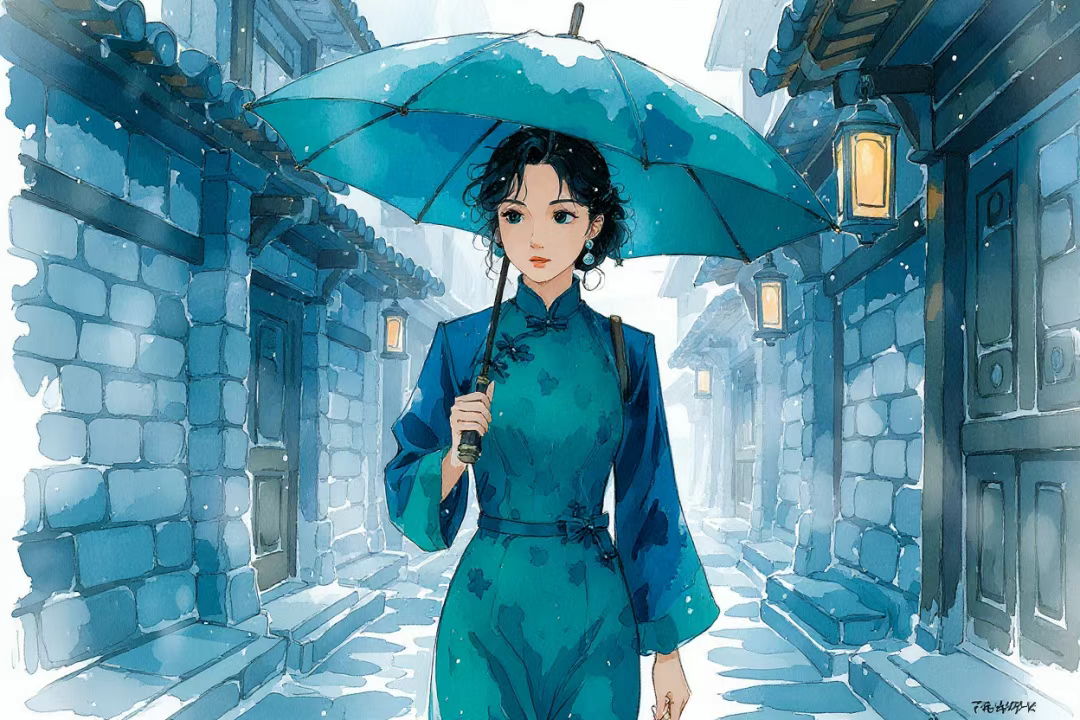
Given a photo of a specified style, Kontext references the style, transfers the style, and generates other scenes. The consistency details are really good. For example, there are strange shoulder straps on the shoulders of the first picture, and the straps on this character still exist when extending other pictures.
📝Prompt: Keeping with the original style, a woman in a dark green cheongsam walks into the alley in the rain with an umbrella, with a faint thoughtful expression on her face. She passes through the gray brick and tile roofs, raindrops gently tap her umbrella, and the lanterns on the roadside sway gently in the wind.

Background Replacement
For example, the familiar old actor Maomao Puppy's Happy Day, this time the color tone and texture are all right, and there is no yellowing. You can see that this accuracy is still a bit shocking.
📝Prompt: Keep the character and material settings the same, but replace the background with a cyberpunk-themed bar. The character raises a mint-colored cocktail in their hand.


Iterative Editing
This is the first model system that allows multiple rounds of natural language-driven visual modification. You can add modifications to the same graph over and over again, as long as each change is made while preserving the previous one.
📝Prompt: The prompt words for the second and third pictures are: Tilt her head towards the camera; Make her laugh

How to Use Image Editor by Flux Kontext Pro
- Sign Up and Log In: Create a free or Pro account on the Fluxpro Kontext platform to access the tool's enhanced features such as saving contextual libraries for reuse.
- Upload Reference Images (Optional): You can upload base sketches or photos to maintain character style, background, or theme consistency throughout image creation or edits.
- Enter Your Text Prompt: Input a descriptive prompt explaining the image you want. Flux Kontext Pro uses deep semantic understanding, so context-rich descriptions yield better, more coherent results, including character consistency and scene details.
- Generate Images: The image editor by flux kontext pro will produce images matching your prompt while maintaining contextual accuracy, character continuity, and logical scene construction. You can edit areas of an existing image with text instructions, like changing a hat color or background, or fully transform styles (e.g., into anime or Ghibli styles).
Summary
Flux Kontext Pro image editor is a powerful text-to-image and image-to-image AI generator emphasizing contextual coherence, style consistency, and semantic understanding to produce highly customized and detailed imagery, suitable for professional creative workflows.
FAQs
Can I Generate Comic Storyboards?
Yes, users can input text by chapters or paragraphs to generate continuous-style scene images, aiding in script development and storyboard design.
What Can I Do With Flux Kontext Pro?
Including but not limited to Text-driven image generation, Precise object or text replacement, Style transfer from reference images, Background or element replacement.
How do I make sure my edits are accurate?
Be specific in your instructions (e.g., “replace the wall color with blue” instead of “make it better”).




















