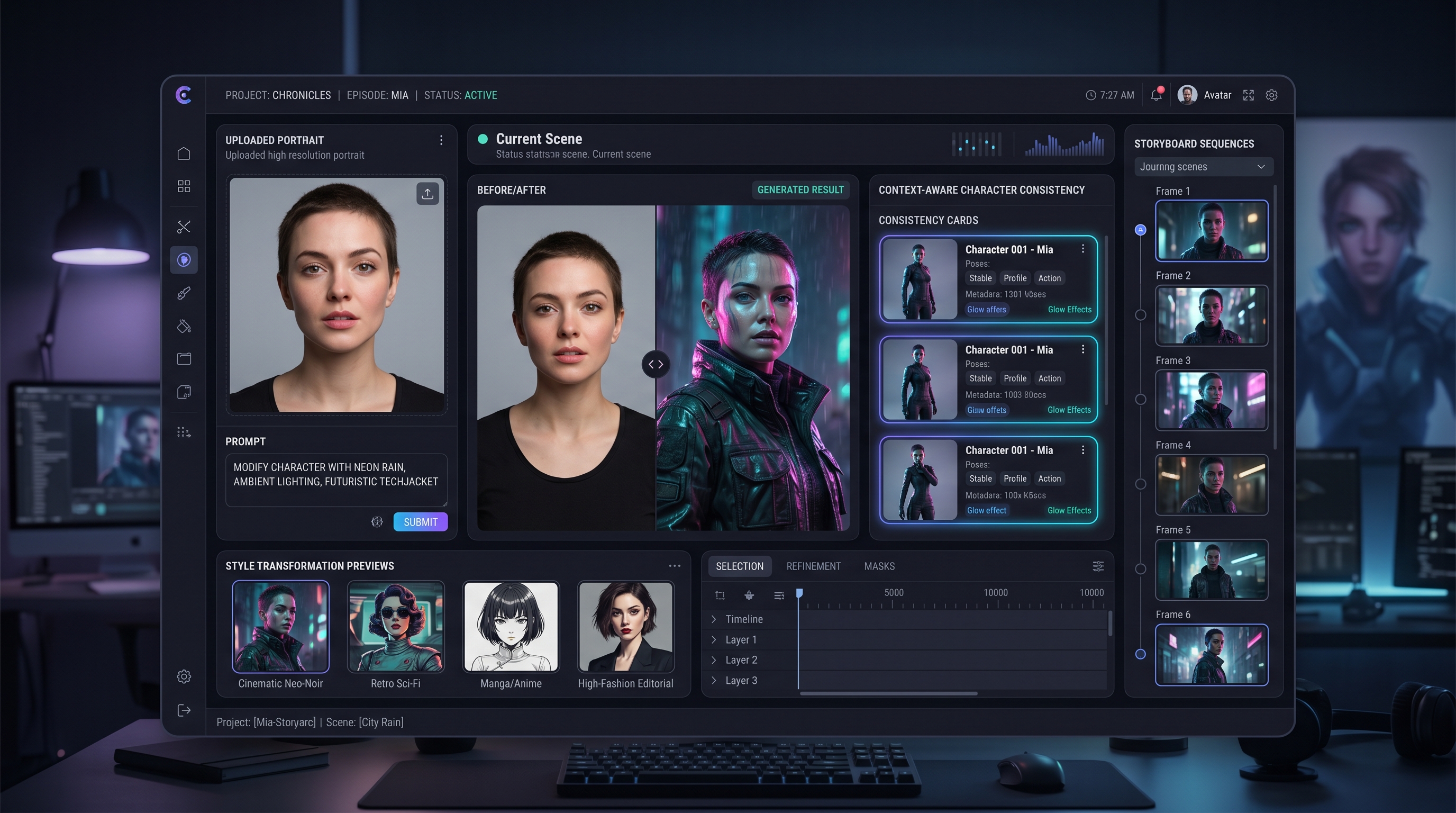
Fylia AI’s Flux Pro Kontext workflow is built around a simple idea: creative AI should understand more than isolated keywords. A strong generator should read the prompt, the uploaded image, the intended style, and the broader visual goal together.
That is why Flux Pro Kontext has become an important topic for creators who want smarter image editing, consistent characters, story-driven visuals, and multi-step creative refinement. Instead of treating every prompt as a one-off command, Flux Pro Kontext focuses on context: what should stay the same, what should change, and what the final image or visual sequence is supposed to communicate.
This guide explains what Flux Pro Kontext is, why context-aware generation matters, how to use it in a practical Fylia AI workflow, and how related tools like image-to-image editing, Ghibli-style generation, action figure tools, and AI video generation can support broader creative projects.
What Is Flux Pro Kontext?
Flux Pro Kontext is a context-aware AI generation and editing model direction designed to understand both text instructions and visual inputs. It is especially useful for creators who need more than a fresh image from scratch. Sometimes the goal is to preserve a face, keep a product shape, maintain a character style, or transform only one part of a visual without destroying the rest.
That is where Flux Pro Kontext becomes useful. It helps creators think in terms of guided transformation rather than random regeneration.
For practical access on Fylia AI, the safest workflow starts from tools such as AI Image Generator, Image to Image AI, and Flux Image to Image. These pages are better replacements for old FluxProWeb links because they keep the user inside the updated Fylia AI ecosystem.
Why Flux Pro Kontext Stands Out
1. Intelligent Prompt Interpretation
Flux Pro Kontext is useful because it treats prompts as creative directions, not just a list of objects. A phrase like “a nostalgic video of a childhood summer” is not only about adding sunshine or warm colors. It implies softness, memory, emotional distance, gentle pacing, and a certain visual atmosphere.
Likewise, a prompt like “dark fantasy image of a lone warrior” should guide the model toward posture, lighting, costume, setting, and mood. A weaker generator may simply place a warrior in a random fantasy scene. A stronger context-aware workflow makes the whole image support the same emotional idea.
2. Smarter Image and Prompt Blending
Flux Pro Kontext is strongest when text and image work together. A creator can upload a sketch, portrait, product photo, or character image, then add a specific instruction:
Keep the same character face and pose. Turn the outfit into a manga-style battle costume, replace the background with a ruined temple, and keep the lighting dramatic.
This kind of hybrid prompt is more useful than pure text generation when continuity matters. The reference image gives the model a visual anchor, while the prompt defines the transformation.
3. Better Consistency for Long-Term Projects
Creators working on comics, storyboards, short films, social campaigns, or recurring characters need consistency. One impressive image is not enough if the next image changes the character’s face, outfit, mood, or art style.
Flux Pro Kontext is valuable because context-aware generation helps maintain visual continuity across revisions. It gives creators a better chance of keeping the same character design, tone, and scene logic while still changing the background, style, camera angle, or narrative beat.
4. Flexible Use Cases Across Creative Workflows
Flux Pro Kontext can support many creator needs:
- Marketing: brand avatars, product scene variations, campaign visuals, and ad concepts
- Education: lesson visuals, illustrated examples, story-based learning assets, and explainer images
- Content creation: social posts, thumbnails, portraits, character images, and short-form visual assets
- Storytelling: recurring characters, scene concepts, comic panels, visual novels, and moodboards
- Design: outfit edits, poster variations, background replacement, and style transformation
The value is not only output quality. The value is creative direction: changing what needs to change while preserving what should remain stable.
How to Use Flux Pro Kontext on Fylia AI
Step 1: Choose the Right Tool
Start with the Fylia AI tool that matches your task.
Use AI Image Generator when you want to create new images from text or reference images.
Use Image to Image AI when you already have a source image and want to transform it with a prompt.
Use Flux Image to Image when your workflow is specifically built around Flux-style image transformation.
Use AI Video Generator when you want to turn a still visual into motion or build a video workflow after finishing the image.
Step 2: Enter a Contextual Prompt
Contextual prompts work better than short style commands. Instead of writing “make it cinematic,” explain what should remain stable and what should change.
Weak prompt:
Make this fantasy.
Stronger prompt:
Keep the same woman, face, and pose. Change the outfit into a dark fantasy cloak, replace the background with a moonlit stone bridge, add soft blue rim light, and keep the expression calm.
A strong Kontext prompt usually includes three parts:
- Preserve: what must stay the same
- Transform: what should change
- Direct: the mood, style, lighting, or story goal
Step 3: Use Visual References Carefully
A good reference image makes the workflow easier. If the source image is blurry, crowded, or poorly lit, the model has less reliable information to preserve.
Use reference images with:
- clear subject identity
- readable pose
- visible clothing or product shape
- simple background
- stable lighting
- minimal clutter
For character work, choose a reference where the face and outfit are easy to read. For product work, choose a clean angle where the product shape is not hidden.
Step 4: Refine One Element at a Time
Kontext-style editing works best when you make controlled revisions. Do not change the background, outfit, camera angle, lighting, and expression all at once unless you want a major transformation.
Try editing one variable per generation:
- background only
- clothing only
- lighting only
- art style only
- expression only
- camera angle only
This gives you more control and makes it easier to understand what improved or weakened the image.
Step 5: Export or Move Into Video
Once the image looks right, you can use it in a larger workflow. A finished Flux Pro Kontext image can become:
- a campaign visual
- a comic panel
- a character reference
- a product mockup
- a storyboard frame
- a video start frame
- a social media asset
If you want motion, move the result into AI Video Generator or related image-to-video workflows.
Creative Tips for Flux Pro Kontext
Combine with Ghibli-Style Tools
If you want soft fantasy visuals, dreamy landscapes, cozy character scenes, or storybook-like images, pair your Kontext workflow with the Ghibli Style Generator or Ghibli Style Video Generator.
For example, you could first use Flux Pro Kontext to preserve a character’s face and pose, then apply a Ghibli-style transformation for a warmer illustrated look.
Maintain Character Design Across Projects
For recurring characters, create a reusable identity block:
Keep the same character: short black hair, round glasses, green jacket, calm expression, soft painterly style, warm studio lighting.
Then add the new scene instruction after that identity block:
Place the character in a rainy train station at night, holding a red umbrella, cinematic reflection on the floor.
This makes your prompts more stable and helps the model understand which details are core identity traits.
Build Action Figure Concepts
If you want collectible-style visuals, character merchandise, or toy-like product concepts, combine Flux Pro Kontext with AI Action Figure Generator or AI Action Figure Video Generator.
This is useful for fictional characters, game concepts, social campaigns, toy mockups, and collectible-style promotional visuals.
Tell Stories Over Time
For visual novels, comics, short films, or marketing campaigns, write prompts as scene beats:
- Scene 1: establish the location
- Scene 2: show the character entering
- Scene 3: close-up emotional beat
- Scene 4: reveal the object, message, or conflict
Use the same character identity block and style block across every scene. Change only the location, camera, and action.
Flux Pro Kontext vs Traditional Generators
| Feature | Flux Pro Kontext Workflow | Traditional One-Shot Generator |
|---|---|---|
| Image + prompt editing | Strong fit | Often less controlled |
| Character consistency | Better with reference use | Can drift between generations |
| Multi-step refinement | Practical | Often requires full rerolls |
| Storytelling workflow | Useful for panels and scenes | Better for isolated images |
| Background and style changes | More targeted | Often broad and unpredictable |
| Beginner accessibility | Good with clear prompts | Simple, but less precise |
The difference is control. Traditional generators can be great for surprising one-off images. Flux Pro Kontext is more useful when the project needs continuity, revision, and visual intention.
Common Mistakes and How to Avoid Them
Mistake 1: Giving Only a Style Word
“Make it cinematic” is too vague. Add subject, lighting, camera, and what should remain unchanged.
Better:
Keep the same character and pose. Add cinematic side lighting, a blurred city background, and a serious expression.
Mistake 2: Changing Too Many Things at Once
If you change the outfit, background, expression, lighting, and style in one prompt, the result may drift too far from the original. Make one major edit at a time.
Mistake 3: Forgetting Preservation Rules
When editing an image, always state what should stay the same:
- keep the same face
- keep the same product shape
- keep the same pose
- keep the same camera angle
- keep the same art style
Mistake 4: Using Weak Reference Images
A poor reference image can limit the edit. Start with the cleanest version available, especially for character or product work.
Best Use Cases for Flux Pro Kontext
Flux Pro Kontext is especially useful for projects that need continuity and targeted editing:
- character redesigns
- product background changes
- fashion edits
- comic panels
- storyboards
- campaign visuals
- avatar variations
- poster concepts
- stylized portraits
- social media assets
- brand moodboards
- visual novel scenes
It is less necessary for random one-off experimentation where nothing needs to stay consistent. For those cases, a general AI Image Generator workflow is enough.
FAQ
What is Flux Pro Kontext?
Flux Pro Kontext is a context-aware image generation and editing workflow focused on understanding both text prompts and visual references. It is useful for edits that need to preserve character identity, scene structure, style, or product details.
Where should I start on Fylia AI?
Start with AI Image Generator for general image creation, Image to Image AI for image transformation, or Flux Image to Image for Flux-style image editing.
Can I combine text prompts with image uploads?
Yes. Upload a source image, then describe what should change and what should stay the same. This is one of the best ways to use Flux Pro Kontext-style editing.
Can Flux Pro Kontext help with comics or storyboards?
Yes. Use consistent character and style blocks across scenes. Keep each prompt focused on one scene beat, camera angle, or visual change.
Can I create videos after editing images?
Yes. After creating or refining an image, you can move into AI Video Generator or a related image-to-video workflow to animate the result.
Final Recommendation
Flux Pro Kontext is most valuable when you need more than a beautiful one-off image. It is built for creators who want targeted editing, character continuity, style consistency, and image transformation that respects the original visual context.
For practical use on Fylia AI, start with AI Image Generator or Image to Image AI. Use clear reference images, write prompts that explain both preservation and change, then refine one element at a time.
If your project involves storytelling, recurring characters, product visuals, or campaign assets, this context-first workflow is one of the smartest ways to turn an idea into a polished visual series.
Recommended Reading
- Introducing Flux Pro Kontext: The Future of Context-Aware AI Generation
- How to Edit Image with Flux Kontext AI: The Smarter Way to Transform Photos
- Use the Impressive Image Editor by Flux Kontext Pro to Make Your Arts
- How to Maximize Your Creative Output with Flux Kontext Pro
More Fylia AI Tools
- AI Image Generator — Create images from text or reference images.
- Image to Image AI — Transform uploaded images with prompt-based edits.
- Flux Image to Image — Reimagine existing visuals with Flux-style editing.
- Ghibli Style Generator — Create dreamy illustrated visuals.
- Ghibli Style Video Generator — Turn soft illustrated concepts into animated visual moments.
- AI Action Figure Generator — Design collectible-style character concepts.
- AI Action Figure Video Generator — Animate action figure-style visuals.
- AI Video Generator — Turn text or images into videos.




















